Why you should run a 64-bit OS on your Raspberry Pi4
Raspberry Pi OS now ships 64-bit by default, which is itself a reasonable summary of this post.
One of the cool things about working for a software company is that you often get new hardware prototypes to test. But that’s not the case here: I bought the Rpi4 because it’s extremely cheap!
The Rpi4 comes with a quad-core ARM Cortex A72, up to 4 GB of RAM, and a gigabit Ethernet port, at a very low price of $35. Raspberry provides Raspbian (a Debian derivative), a ready-made distro for their products, so I put it on an SD card to boot it quickly. I was looking at the syslog and I noticed that, uh, both the kernel and the entire userland were compiled as armv7, which means 32-bit ARM.
I knew for sure that the RPi4 is 64-bit capable, so I refused to run a 32-bit OS on it. I got another SD card and installed Debian on it: a lean and mean Debian compiled as aarch64, which means 64-bit ARM. As soon as the 64-bit OS booted, I was curious to see how much better it performed than the 32-bit one, so I ran some tests.
Synthetic benchmarks
The first test that came to mind was the old dhrystone benchmark, which has existed since the dawn of time.
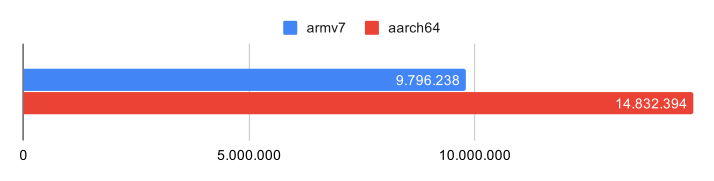
dhrystones per second, higher is better
dhrystone is a program written in 1988 which performs some math calculations.
It’s unlikely to simulate any modern workload; the only reason we still use it is to have some consistency between past architectures and software.
A more modern number-crunching task would be a hash calculation, so I wanted to run a SHA1 test.
Unfortunately the Debian sha1sum utility was compiled without libssl or kernel crypto support, so I had to compile it from source.
To avoid an I/O bottleneck, I calculated the hash of a 2 GB sparse file created with truncate -s 2GB, so the I/O from the SD card was zero.
A SHA1 hash is a more real-life benchmark than dhrystone, as this algorithm is used in a lot of applications, e.g. torrent, git, etc.
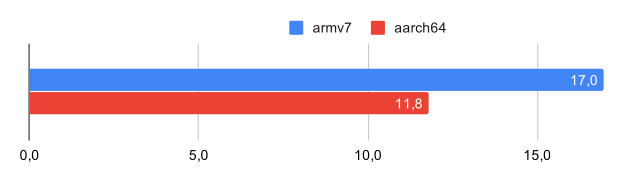
sha1sum execution time in seconds, lower is better
RAM
A 64-bit system means that RAM can be accessed in 8-byte reads and writes per instruction.
I wrote membench, a simple tool which allocates a big buffer, writes to it, and then reads it back.
To be sure that the RAM was really allocated I used mlock() on the whole buffer.
In this test the buffer is 2 GB; a 3 GB buffer worked in 64-bit mode but gave an out-of-memory error in 32-bit.
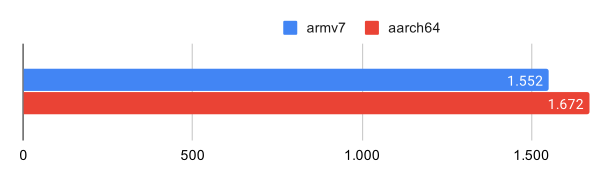
ram access in mbytes per second, higher is better
Audio encoding
I noticed that many Rpi users run the board as a media center, so I did an audio encoding test with the two most widely used codecs. I encoded “Echoes” by Pink Floyd because it’s a very long track, which gives more measurable values. To avoid I/O, both the source and the destination file were on a ramfs:
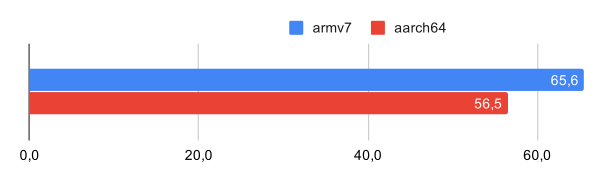
lame encoding time in seconds, lower is better
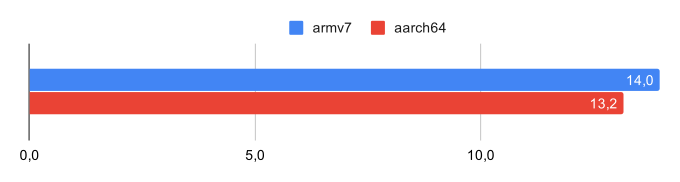
flac encoding time in seconds, lower is better
Networking benchmarks
Another common use of the Raspberry boards is as a simple VPN or firewall.
I don’t endorse using such systems for this purpose, but many people still have slow <100 mbit links, so they can turn a blind eye to the poor Rpi performance.
The first question is: how much traffic can the Rpi4 handle?
We need to measure the pure networking power of the board first, without the limitations of the physical interface, so I ran an iperf3 session between two containers.
Beware: containers tend to communicate via a veth pair, and veth is known to accelerate traffic via a lot of fake offloads.
IP checksum offload is done by just skipping the checksum calculation, while TCP segmentation offload is done by never segmenting or reassembling the traffic: big 64k chunks of data are just passed through memory as is.
To work around this, I disabled the offloads with ethtool -K veth0 tx off rx off tso off gro off gso off.
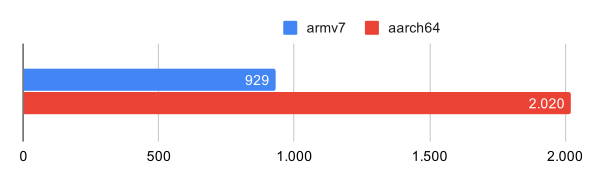
mbit per second, higher is better
Firewalling
The fastest thing a network appliance can do is drop traffic, and the fastest way to drop traffic is via a TC drop rule. To avoid reaching the line rate, I used the minimum Ethernet frame size, 64 bytes. This is a drop-rate test.
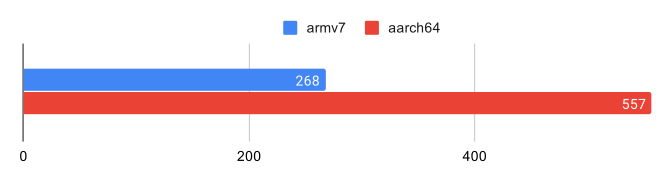
thousands of packets per second, higher is better
Although neither system was able to reach the line rate (which is 1.5 Mpps), the 64-bit kernel scored a bit higher than the 32-bit one. If you want to use the Rpi4 as a firewall, a 64-bit kernel is definitely a must-have.
VPN
Another common use of the Rpi is as a VPN server, OpenVPN to be precise. My preferred VPN software is WireGuard, so I tested both, since both are very simple to set up:
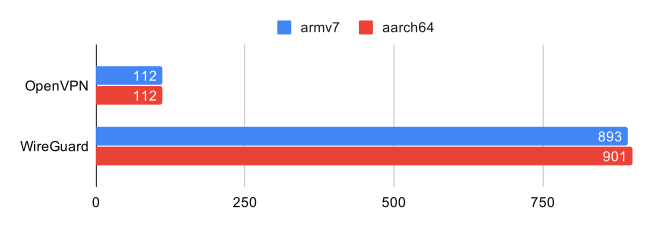
mbit per second, higher is better
As expected, OpenVPN is 10x slower than WireGuard. A less expected result is that OpenVPN performs the same in both 32- and 64-bit modes. WireGuard, on the other hand, almost saturates the gigabit port in both versions; we get the same results with both kernels, so we probably hit the NIC limit. To check whether WireGuard could go even faster, I did another VPN test using two containers, skipping the physical Ethernet. The only drawback of this container test is that both the iperf3 client and server were running on the Rpi4, keeping two cores busy.
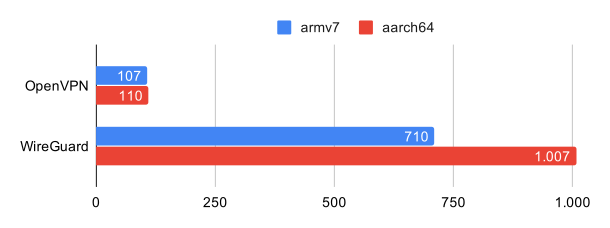
mbit per second, higher is better
As expected, OpenVPN and 32-bit WireGuard, which were CPU-limited, performed worse, while 64-bit WireGuard performed better.
Conclusions
I often read statements like “it’s not worth it” or “you’ll only gain a few milliseconds”, just because the Rpi isn’t that powerful. That’s not true! As any embedded guy knows, with slow hardware, having well-optimized software matters even more than on powerful machines. I already knew that a 64-bit OS would perform better on the Rpi4; what I didn’t know was how much. That’s why I ran this test series, and I hope you enjoy reading it!
Updates
- Post-publication — by popular demand, I published the Debian image I used for these tests: rpi4_64bit.zip on Google Drive. Minimal distribution (install your preferred tools by hand). The kernel is the stable 4.19 from Raspberry rather than my vanilla one, because it supports a wider range of devices. DHCP on Ethernet; SSH in as
user/user, thensudo -i. The bundledmksdscript partitions an SD card and extracts the archive. - Mid-2020 — Raspberry started selling the 8 GB Raspberry Pi 4. One more argument for 64-bit: with a 32-bit kernel, usable memory caps at ~3 GB.